Invoice & get paid

Invoice loads
in one batch.

Verified loads arrive from Paperwork already billing-ready. Select them, generate clean invoices, and send by email or customer portal in a single sweep. Track every dollar from released to paid.

The billing pipeline

From released to paid, in one flow.

Loads land in Released the moment Paperwork marks them verified. Generate the invoice, send it, and watch it move to paid. Every bucket carries its own count and dollar total.
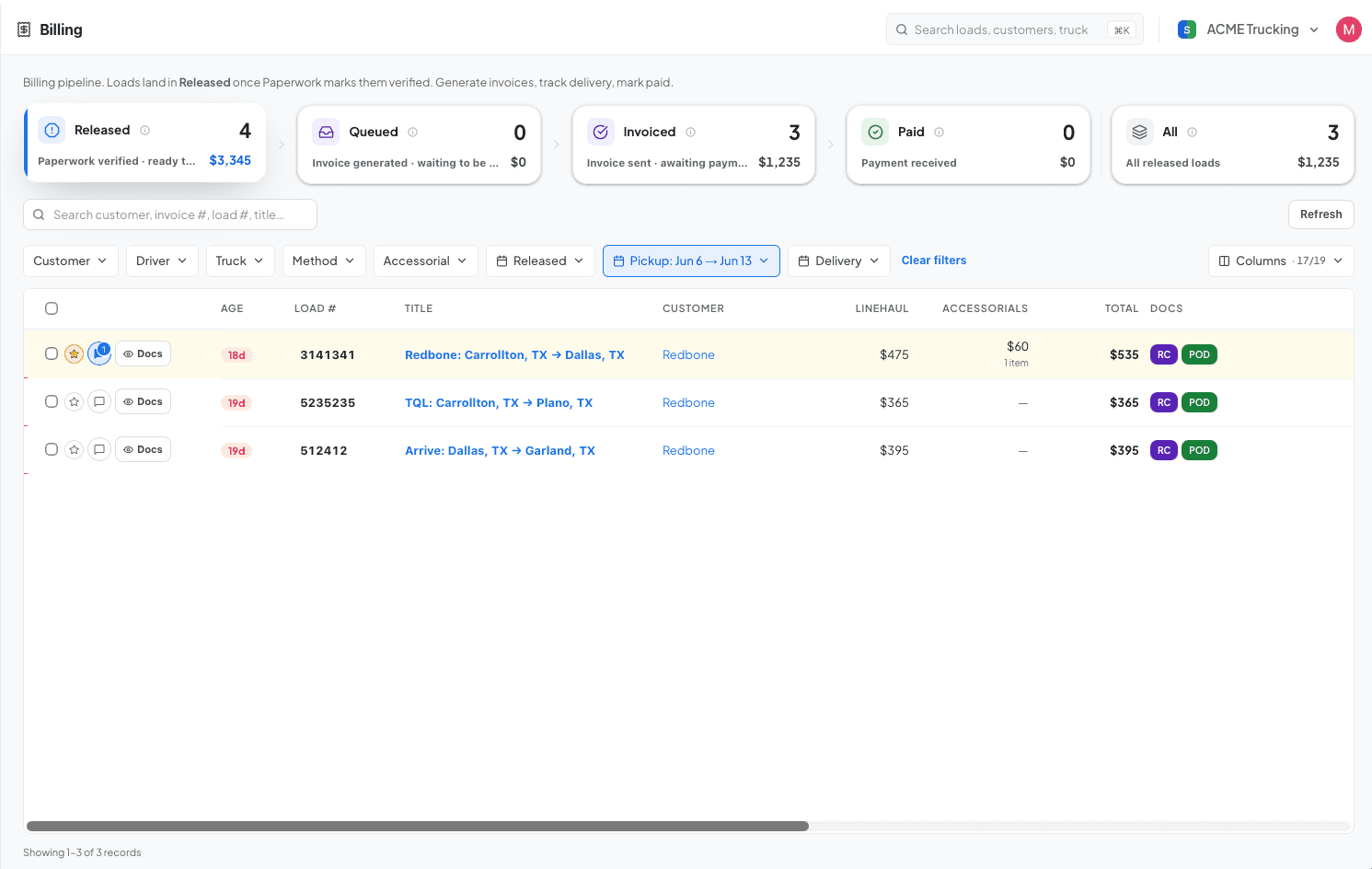
Billing board with released loads ready to invoice
4 selected · $3,345.00 Generate Invoice Create & Send
AI invoice routing

No more digging through rate cons to follow billing instructions.

FleetCal scans each customer's rate con for billing instructions and sets the right method automatically, whether that's email to their AP or a link into their online portal. Confirm or override, and it's saved for every future invoice.

Invoice routing
Billing email
ap@arrivelogistics.com
Shown on every invoice for this customer in the “Bill To” block.
Invoicing instructions
Submit POD within 48 hours of delivery. For payment inquiries contact apquestions@arrivelogistics.com.
Relevant instructions pulled from the rate con.
Invoice documents

Choose exactly which docs go on the invoice.

Your org sets defaults for what's included on every invoice, so the right documents are attached automatically. Review the rate con, POD, and accessorial receipts right on the page and adjust the selection for any customer. What you select is what they receive.

Arrive: Fort Worth, TX → Lancaster, TX
#1494245 · documents on invoice
$535.00
3 of 4 documents attached Preview invoice
Track to paid

Generate, send, regenerate, mark paid.

Filter by accessorial, pickup date, or customer to find the right loads. Leave a note for later, regenerate and resend an invoice when something changes, and mark it paid the moment the money lands.

Arrive: Fort Worth, TX → Lancaster, TX
#1494245 · $535.00
Released
Released for billing
Verified in Paperwork
Invoice generated
Builds the PDF
Sent to Arrive AP
Emails the customer
Payment received
Awaiting payment
Before & after

The old way, and the FleetCal way.

Here is what changes the day a fleet moves onto FleetCal.

The manual way
Invoicing a load

Open a template, retype the rate, stops, and reference numbers from the rate con, attach docs by hand.

Getting billing right

Dig through the rate con to find each customer’s billing instructions before you can invoice.

Catching accessorials

Dispatch notes there was detention on a load, but it never gets followed up on or billed.

Batching end-of-week billing

Work through a pile of rate cons Friday afternoon, invoicing each load one at a time.

Tracking what’s been paid

An email inbox and a spreadsheet, updated by hand, things slip when you’re busy.

With FleetCal
Invoicing a load

The invoice pulls from the load automatically, rate, stops, reference numbers already there. One click to send.

Getting billing right

AI extracts the billing instructions, so you can send the invoice confident it will reach them.

Catching accessorials

See when a load has accessorials and make sure they’re approved before it goes out for billing.

Batching end-of-week billing

Select all delivered loads and generate invoices in bulk. A week’s billing in a few minutes.

Tracking what’s been paid

Every invoice has a status: sent, pending, paid. Outstanding AR shows on the dashboard without digging.

Get started

Invoice on delivery day. Get paid sooner.

14 days free. No sales call. The whole dispatch-to-invoice loop in one place.

Start free trialBook a demoBack to home